





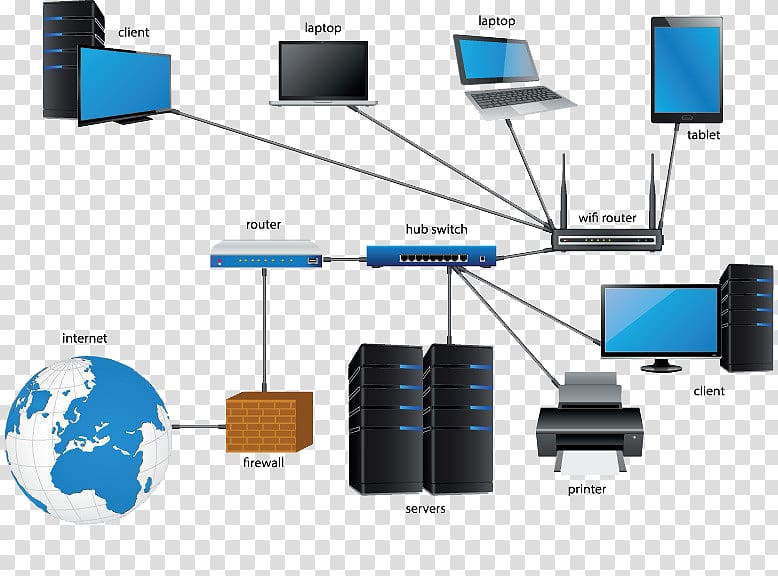
Learn how networks work, set up LAN/Wi-Fi, troubleshoot connectivity issues, and ensure network security basics.
Introduction to Networking
1. How Networks Work
-
A network is a group of devices (computers, phones, printers) that can communicate with each other.
-
Devices talk using IP addresses and follow rules called protocols (like TCP/IP).
-
Networks can be wired (Ethernet cables) or wireless (Wi-Fi).
2. Setting Up a LAN/Wi-Fi
-
LAN (Local Area Network) connects devices in one location, like your home or office.
-
Wi-Fi allows devices to connect without cables.
-
To set up:
-
Connect a router to your internet.
-
Connect devices via Ethernet cables or Wi-Fi password.
-
Assign IP addresses automatically (DHCP) or manually.
-
3. Troubleshooting Connectivity Issues
-
Common problems: slow internet, no connection, or device not visible.
-
Basic steps:
-
Check cables and Wi-Fi signal.
-
Restart router or device.
-
Use ping to check connectivity.
-
Check IP settings and firewall rules.
-
4. Basic Network Security
-
Protect your network to keep data safe:
-
Use strong Wi-Fi passwords.
-
Enable encryption (WPA3 is best).
-
Keep your router and devices updated.
-
Limit guest access and monitor connected devices.
-